A 3D printer turns a kid's idea into something they can hold an hour later, which is close to magic when you are eight. But the same machine also runs a nozzle hot enough to burn, and the cheap ones can bury that wonder under fiddly leveling and calibration that sends a child straight back to the tablet. We analyzed thousands of verified buyer reviews, recent sales data, and expert evaluations to find eight 3D printers that keep little fingers safe and get a first print going without a fight.
Every product we compared, in ranked order. Tap through to Amazon to check today's price, or jump to the full review below.
1
AOSEED X-Maker AI+ 3D Printer for Kids
Best Overall13% OFF
AOSEED X-Maker AI+ 3D Printer for Kids (12,000+ Model Library)
5.0
150 x 150 x 150mm build · AI design apps · Built-in monitoring camera
Our Best Overall pick: a fully enclosed, leveling-free 3D printer built specifically for children, pairing a touch-friendly app with AI design tools that turn a sketch or photo into a printable toy. Tom's Hardware and The Gadgeteer both praised how little setup it demands before a child can start printing on their own.
260 x 260 x 260mm build · Up to 16 colors · 600mm/s max speed
A fully enclosed CoreXY printer bundled with Creality's Filament System for native multicolor prints up to 16 colors. The Gadgeteer and Fabbaloo both found print quality excellent, with the color-change unit handling filament swaps reliably in testing.
600 mm/s max speed · 260 x 260 x 260 mm build · 4-color ACE Gen 2 system
Our value pick: Anycubic squeezed its ACE Gen 2 multicolor system directly into the printhead, cutting filament waste dramatically and making four-color printing genuinely affordable and quiet.
260 x 260 x 260mm build · 4-color ACE Gen 2 system · 600mm/s max speed
A budget-friendly bedslinger that brings native 4-color printing and RFID filament scanning to a $300 price point. TechRadar and Fauxhammer both called out its fast setup and reliable auto leveling as standout for a printer this affordable.
220 x 220 x 220mm build · CoreXY motion · Quick-swap nozzle
A fast CoreXY printer built for straightforward single-color PLA and PETG work, with a quick-swap nozzle system that needs no tools. TechGearLab and other reviewers rated it a strong low-cost option, noting real-world print speeds of 150-300mm/s well above typical beginner printers.
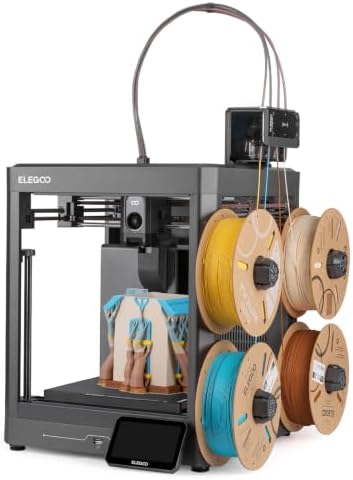
ELEGOO Centauri 2 Combo 3D Printer (4-Color CoreXY)
4.7
256 x 256 x 256mm build · 4-color CANVAS system · CoreXY motion
The ELEGOO Centauri 2 Combo pairs a CoreXY motion system with ELEGOO's CANVAS four-color filament unit, letting kids print multicolor toys and school projects without manual filament swaps. Tom's Hardware called it a very good four-color printer for the price, though it skips the enclosure and camera found on pricier siblings.
Entina Tina2C Mini 3D Printer Starter Bundle (3,000+ Model Library)
4.6
100 x 100 x 100mm build · One-click auto leveling · WiFi & app control
The Entina Tina2C is a compact, fully assembled starter printer built around one-click auto leveling and a bundled four-color PLA set, so a child can start printing the same day it arrives. Its 100mm cubed build volume keeps projects small, but that also keeps the price and the learning curve low.
Short on time? These three cover most families: the AOSEED X-Maker AI+ as our Best Overall pick for its enclosed build, AI design tools and the largest model library in this lineup; the Entina Tina2C as the best-value pick for a tiny, fully assembled starter printer; and the Magic Jimmy Spark AI as the safest, simplest pick for younger beginners, with its sealed cool-touch enclosure and sketch-to-print AI tools.
Best Overall
AOSEED X-Maker AI+ 3D Printer for Kids
AOSEED X-Maker AI+ 3D Printer for Kids (12,000+ Model Library)
3D Printers for Kids 101: What They Do & How to Choose
Understand the category before you buy - what the science actually says, and which specs matter.
Every printer on this list promises to be easy and safe, but the way each one handles a hot nozzle and a first-time setup varies a lot. Here is how they work, why the design matters far more than the spec sheet for a young maker, and the handful of features actually worth comparing.
What does a 3D printer for kids actually do?
A 3D printer builds an object one thin layer at a time. It melts a plastic thread called filament, pushes it through a heated nozzle, and lays it down in a pattern until a flat design grows into a solid toy, figure, or gadget. On a kids' model, most of the hard part is meant to be hidden:
You pick a model from an app or an on-board library instead of designing from scratch.
The printer heats its nozzle and, on nearly every model here, levels its own bed automatically so the first layer sticks.
It prints while a child watches through the window, then cools down before anyone reaches in.
Some in this lineup lean even further into simplicity. The X-MAKER JOY AI+ ships fully assembled with more than 1,500 ready models for a guided, no-decisions start.
Why a kid's printer lives or dies on safety and simplicity
Here is the thing most spec sheets bury. For a child, how the printer is built matters far more than how fast or fine it prints, because two design choices decide whether the machine is safe and whether your kid sticks with it.
The first is heat protection. Some children's printers use a low-temperature filament that melts far cooler than usual, but every model in this lineup runs a standard hot nozzle, from 220 to 320 degrees, so the real safeguard here is a full enclosure that walls the heat off from little hands. The Anycubic Kobra S1, the X-MAKER JOY, the SainSmart PrintyGo Mini and the Creality K2 Combo are all fully enclosed, and the X-MAKER JOY goes further with a touch-safe exterior, rapid cool-down and an emergency pause. The FLASHFORGE Adventurer 5M and the AD5X ship as open frames, with an enclosure sold separately, which is worth knowing before you hand one to a young child.
The second is a genuinely easy start. A one-touch or app-guided workflow gets a machine printing without the leveling and calibration that make grown-up printers frustrating. Nearly every model here levels its own bed automatically, and the FLASHFORGE units add one-click calibration, so a kid can go from idea to print without an adult troubleshooting for an hour.
Once safety and ease are handled, whether the printer uses cheap standard filament and how large it can print decide how long the novelty lasts.
Which specs actually matter?
With safety and simplicity settled, a few features separate the models:
Enclosure: The single most important safety feature. A fully enclosed frame keeps hands away from the hot nozzle; an open frame like the Adventurer 5M or AD5X needs closer supervision or the optional enclosure.
Setup and leveling: Automatic bed leveling is standard across this lineup. A fully assembled, one-touch machine like the X-MAKER JOY removes the most common first-print headache entirely.
Nozzle temperature: These run from 220 to 320 degrees, all hot enough to burn, which is exactly why the enclosure and cool-down behavior matter more than the number itself.
Filament type: Every printer here uses common PLA, the cheap and widely stocked standard, and the X-MAKER JOY includes eight PLA filaments to start, so refills stay inexpensive.
Build volume: How big your kid can dream. Sizes span from 120 x 120 x 120 mm on the compact X-MAKER JOY AI+ up to 260 x 260 x 260 mm on the Anycubic Kobra X and the Creality K2 Combo, so larger projects need a roomier bed.
Guided content and app control: A big on-board or app library, like the X-MAKER JOY's 1,500-plus models and AI Doodle voice, text and photo design tool, keeps a child printing without needing design skills.
Monitoring: Built-in or AI cameras on the Anycubic Kobra S1, Anycubic Kobra X and the Creality K2 Combo let you watch a print, with the K2 Combo's dual AI cameras helping catch problems mid-print.
How we grade products
Graded Picks rankings are aggregated from several independent signals: verified buyer ratings and the size of the review base for credibility, recent monthly purchase volume for relevance, assessments from trusted maker and family-technology publications, and how each product places in leading category lineups. For kids' 3D printers we weigh:
Safety design, including enclosure and cool-down behavior
Ease of setup and first-print success
Simplicity of the app or on-board library
Filament cost and availability
Build volume and project range
Supervision and monitoring features
Overall value for the price
Safety note: A 3D printer is not a hands-off toy. Every model here heats its nozzle to at least 220 degrees, so keep an adult nearby, favor a fully enclosed frame for younger children, and let the machine cool before anyone reaches inside. Filament and printed pieces can include small parts, so keep them away from very young siblings, store filament dry and out of reach, and follow the manufacturer's age guidance for setup and handling.
In-Depth Reviews
Everything we learned from buyer reviews and expert testing, product by product.
AOSEED X-Maker AI+ 3D Printer for Kids
Best Overall13% OFF
1. AOSEED X-Maker AI+ 3D Printer for Kids (12,000+ Model Library)
5.0
The X-Maker AI+ arrives fully assembled and pre-leveled, so there is no calibration step standing between unboxing and a child's first print. Its library of more than 12,000 ready-made models pairs with AI Craft-style tools that convert a doodle, photo, or text prompt into a printable design, a feature The Gadgeteer and Tom's Hardware singled out as unusually approachable for young users. A built-in camera time-lapses every job and flags failures through the companion app, and the fully enclosed housing with a flexible magnetic plate keeps the hot nozzle and moving parts away from curious hands. Print speeds up to an advertised 300mm/s and 0.05mm layer precision keep output quality high for a machine this size. Reviewers noted it runs quietly, under 50 dB, which matters in a shared kids' room or classroom.
Build Volume150 x 150 x 150mm
Max Print Speed300mm/s (advertised)
Layer Precision0.05mm
Nozzle/Bed Temp260C / 110C (advertised)
ConnectivityWi-Fi, USB
Noise LevelUnder 50 dB
Safety DesignFully enclosed, magnetic flexible plate
Pros
Fully enclosed housing and cool-touch exterior built with young users in mind
AI design tools turn a child's sketch or photo into a printable model
Arrives pre-leveled with a 12,000+ model library ready to print
Built-in camera time-lapses prints and flags failures early
Quiet operation suits a shared bedroom or classroom
Cons
Small 150mm cube build volume limits larger projects
AI design app requires an internet connection to generate new models
Premium price compared to simpler kid-friendly printers in this lineup
Who is it for?
Families who want a true start-to-finish kids' printer, where a child can design and print toys without an adult tuning settings.
Who is it not for?
Hobbyists who want a larger build plate or full manual control over print settings.
2. AOSEED X-MAKER JOY AI+ 3D Printer for Kids (8,000+ Model Library)
4.9
AOSEED's X-MAKER JOY AI+ listing stands out on the strength of its fully enclosed, kid-safe design, an 8,000-plus curated toy library, and AOSEED's AI Doodle tool, which lets a child describe a model by voice, text or photo and have the printer build it without touching a slicer. The printer is fully enclosed and, per AOSEED's own product testing, has been evaluated by TUV Rheinland against ISO 16000 for indoor air safety, and its leveling-free rigid bed skips the calibration step that trips up most first-time users. One-click printing from the companion app, a 400 mm/s rated top speed and a bundled 8-color PLA filament set round out a machine built to get a child from unboxing to a finished print in as few steps as possible. It is also discounted off list price at the time of our scan, which adds to its value. The trade-off of being a newer listing is that it has not yet built up the same depth of independent, model-specific test data as some other printers in this lineup, and its sibling X-Maker AI+ above now edges it out on model-library size and AI tools.
Build volume120 x 120 x 120 mm
Max print speed400 mm/s
Max nozzle temperature260°C
Bed levelingLeveling-free rigid bed (no calibration needed)
ConnectivityWi-Fi app control (one-click), AI Doodle voice/text/photo commands
Child-safety featuresFully enclosed housing, TUV Rheinland-tested per ISO 16000
Warranty1-year limited warranty
Pros
AI Doodle voice, text and photo-to-print tool needs no slicer knowledge
Fully enclosed housing tested by TUV Rheinland against ISO 16000 for indoor air safety
Leveling-free rigid bed skips the calibration step that trips up first-time users
Expanded 8,000-plus curated toy model library plus AOSEED's gamified design apps
One-click Wi-Fi printing and a bundled 8-color PLA filament set for an immediate start
Cons
Newer listing, so independent, model-specific testing is still thin
Small 120 mm cube build volume caps project size
Wi-Fi app connection is required to print - there is no fully offline mode
Who is it for?
Most families: parents who want a current, content-rich, voice-controlled kids' printer with an enclosed build and almost no setup.
Who is it not for?
Anyone printing projects larger than a 120 mm cube, or teens who want multicolor and engineering filaments.
The K2 Combo pairs a CoreXY motion system with a direct-drive, all-metal hotend rated to 300C, giving it the speed and thermal headroom to handle demanding filaments as kids graduate beyond basic PLA. It ships with one Creality Filament System unit, expandable to four, for up to 16 colors in a single print, and reviewers at The Gadgeteer and Fabbaloo reported the color swaps completed without failures across multiple test prints. Dual AI cameras monitor the print bed and flag issues remotely through the app. The fully enclosed chassis arrives pre-assembled with guided auto leveling, so setup is largely plug-and-print despite the machine's advanced feature set. Measured noise sits around 57 dB at standard speed, noticeably louder than the kid-focused printers in this lineup.
Build Volume260 x 260 x 260mm
Max Print Speed600mm/s
Max Acceleration30,000mm/s^2
Max Nozzle Temp300C
Multicolor SystemCreality Filament System, up to 16 colors
Noise LevelAbout 57 dB at standard speed
ConnectivityWi-Fi, dual AI cameras
Pros
Native multicolor printing with up to 16 colors via the bundled Filament System
CoreXY frame and 300C hotend handle advanced filaments, not just PLA
Fully enclosed, pre-assembled with guided auto leveling
Dual AI cameras for remote print monitoring
Cons
Noticeably louder than the kid-dedicated printers in this lineup
Not designed with child-safety features like a cool-touch exterior
Higher price puts it closer to a family hobbyist machine than a starter kids' printer
Who is it for?
Families with an older kid or teen ready to graduate from toy-focused printers into real multicolor, multi-material printing.
Who is it not for?
Parents of younger children who want a dedicated, child-safe enclosure and simplified app, not a full-featured hobbyist machine.
The Kobra X mounts its ACE Gen 2 color-swap hardware right on the printhead, shrinking the retraction distance to a fraction of older multicolor systems and cutting filament waste by a wide margin in independent testing. Reviewers timed four-color swaps at 5-6 seconds - faster than several pricier rivals - and clocked box-to-leveled-bed setup at about 22 minutes thanks to fully automatic 49-point calibration. It runs quietly enough that testers directly contrasted it with noisier competitors one room away, and its 260 x 260 x 260 mm build volume is the largest in this lineup. The honest caveats: loading and swapping filament across four spools adds a layer of complexity beginners will need a few tries to master, and the open motion system means it's not the pick for engineering-grade ABS at scale. For families who want color variety at a genuinely accessible price, it's hard to beat.
The Kobra X integrates Anycubic's ACE Gen 2 color engine directly into the toolhead carriage, shortening filament paths for faster color swaps and less purge waste compared to older multicolor setups. Its 260mm cube bed uses 49-point LeviQ 3.0 auto leveling with a flexible, magnetic plate, and the hardened-steel nozzle reaches 300C for materials beyond basic PLA. A built-in camera supports remote monitoring and spaghetti-failure detection, and RFID scanning on Anycubic-brand filament automatically identifies color and material. TechRadar and Fauxhammer reviews both noted setup finishes in under 25 minutes with no manual leveling required. It's an open-frame bedslinger rather than an enclosed box, so it lacks the child-safety housing of the dedicated kids' printers in this lineup.
Build Volume260 x 260 x 260mm
Max Print Speed600mm/s
Multicolor SystemACE Gen 2, up to 4 colors (expandable to 19 via modules)
Max Nozzle Temp300C
Bed Leveling49-point LeviQ 3.0 auto leveling
ConnectivityWi-Fi, built-in camera
Frame TypeOpen-frame bedslinger
Pros
Native 4-color printing at a budget price point
49-point auto leveling and RFID filament scanning simplify setup
300C hotend handles more than basic PLA
Setup reported at under 25 minutes with no manual calibration
Cons
Open-frame design, not enclosed, so moving parts and the nozzle are exposed
No child-safety housing like the dedicated kids' printers in this lineup
Full RFID convenience is limited to Anycubic-brand filament
Who is it for?
Budget-conscious parents helping an older kid learn real 3D printing workflows, supervised rather than fully hands-off.
Who is it not for?
Parents who need an enclosed, cool-touch machine for younger or unsupervised use.
The Adventurer 5M uses a CoreXY motion system rated to 600mm/s travel speed and 20,000mm/s^2 acceleration, though reviewers found real-world quality prints run closer to 150-300mm/s, still well ahead of typical beginner machines. Its standout feature is a tool-free quick-swap nozzle system that lets a user change nozzle sizes in seconds, paired with fully automatic 11-point bed leveling and a filament run-out sensor. The extruder reaches 280C with a heated bed up to 110C, and connectivity spans Wi-Fi, Ethernet, and USB. Reviewers were clear that it's best suited to single-color PLA and PETG work, since it does not include stock multicolor hardware, an enclosure, or filtration. It's an open-frame machine, not purpose-built for kids, so adult supervision matters more here than with the enclosed printers in this lineup.
7. ELEGOO Centauri 2 Combo 3D Printer (4-Color CoreXY)
4.7
The Centauri 2 Combo brings ELEGOO's CANVAS automatic filament system to a budget-friendly CoreXY printer, so a child can queue up a four-color print and let the machine swap spools on its own. A 256 x 256 x 256mm build volume gives room for larger school projects than most printers in this lineup, and the PEI-coated flex plate pops finished prints free with a light bend. Automatic bed leveling with Z-offset calibration and a filament runout sensor cut down on failed prints that would otherwise need an adult's help to diagnose. A 5-inch color touchscreen and WiFi, LAN, or USB connectivity keep setup and monitoring straightforward for a family printer. Tom's Hardware found print quality solid at everyday speeds, noting the tradeoff is a lack of enclosure, lighting, or a monitoring camera compared to ELEGOO's higher-end Centauri Carbon 2 models. For families mainly printing PLA toys and multicolor keepsakes, that tradeoff keeps the price down without giving up the core multicolor feature.
Build Volume256 x 256 x 256mm
Max Print Speed500mm/s (advertised)
Filament SystemCANVAS 4-color automatic feeder
Nozzle/Bed Temp350C / heated bed (advertised)
ConnectivityWiFi, LAN, USB
Display5-inch color touchscreen
Safety DesignOpen frame, no enclosure or camera
Pros
CANVAS four-color system automates filament swaps so kids can design multicolor prints without constant supervision
256mm cubed build volume handles larger school projects than most printers in this lineup
Automatic bed leveling and a filament runout sensor reduce failed prints
5-inch touchscreen and WiFi/LAN connectivity make monitoring simple for a shared family printer
Advertised speeds up to 500mm/s keep multicolor jobs from dragging on
Cons
No enclosure, camera, or internal lighting, so ABS and other finicky filaments are off the table
Four-color swapping adds extra purge waste and time between color changes
Open frame design leaves moving parts and the hot nozzle exposed, so younger kids still need adult supervision
Who is it for?
Families who want multicolor prints without manually swapping filament and don't mind an open-frame printer.
Who is it not for?
Parents who want a fully enclosed, hands-off printer for younger children should look at the AOSEED picks instead.
8. Entina Tina2C Mini 3D Printer Starter Bundle (3,000+ Model Library)
4.6
The Tina2C trades build volume for simplicity, arriving fully assembled with 9-point auto leveling and auto nozzle cleaning already configured out of the box. Its 100 x 100 x 100mm print area suits small keychains, name tags, and classroom STEM projects rather than large models, which keeps slicing and printing times short for a child's attention span. A flexible spring-steel plate releases finished prints with a light bend, and the bundle ships with a 4-color PLA set so new printers can start right away without a separate filament purchase. WiFi and app control let a parent queue up prints from the included model library, while a TF card offers offline printing when WiFi is unavailable. Reviewers note the printer runs quietly, typically under 45 dB, making it suitable for a bedroom or classroom without disrupting others. The tradeoff for its low price and small footprint is a tiny build volume that limits what projects are realistically possible.
Build Volume100 x 100 x 100mm
Max Print Speed100mm/s (advertised), 70mm/s stable
Nozzle Temp245C (advertised)
Leveling9-point automatic, auto nozzle cleaning
ConnectivityWiFi, TF card offline printing
Noise LevelUnder 45 dB
Included Filament4-color PLA bundle (Red/White/Blue/Green)
Pros
Fully assembled with one-click auto leveling, so setup takes minutes rather than hours
Bundled 4-color PLA filament set lets a new printer start right away
Quiet operation, typically under 45 dB, suits a bedroom or classroom
WiFi and app control plus offline TF card printing give flexible ways to send a job
Lowest price in this lineup makes it an easy first printer to try
Cons
100mm cubed build volume limits prints to small keychains and name tags
Lacks the AI design tools and enclosure found on pricier picks in this lineup
Slower stable print speeds mean small prints still take a while to finish
Who is it for?
Parents looking for the lowest-cost way to try 3D printing with a young beginner.
Who is it not for?
Kids who want to print larger toys or multicolor models need a printer with more build volume, like the Centauri 2 Combo or Creality K2.
The stars you see are the Graded Picks cumulative score, not a single retailer's average. It blends verified buyer reviews aggregated across major retailers, assessments from professional reviewers and expert testers, and how prominently the product features in leading category lineups.
Advertising Disclosure
Our rankings are compiled by aggregating several independent signals, including verified buyer feedback, how popular a product currently is with shoppers, and evaluations published by professional reviewers. Editorial opinions are our own.
Please note that we participate in affiliate marketing programs. When you purchase through links on our site, we may earn a commission. As an Amazon Associate we earn from qualifying purchases. This comes at no additional cost to you and helps support the resources required to provide valuable content.