Every family has the same problem: one person keeps their work schedule in Outlook, another lives in Apple Calendar, the kids' activities are buried in a Google account, and no one has the full picture. A digital family calendar is a touchscreen you hang on the wall that pulls all of those separate calendars into one shared view. But cheap ones sync only one account or hide the useful features behind a monthly fee. We analyzed thousands of verified buyer reviews, recent sales data, and expert evaluations to find six digital calendars that bring the whole household onto one screen.
Every product we compared, in ranked order. Tap through to Amazon to check today's price, or jump to the full review below.
1
Linkdaze 15.6-inch Smart
Best Overall
Linkdaze 15.6-inch Smart Calendar & Chore Chart
5.0
15.6" 1080p touchscreen · 64GB · AiMOR app sync
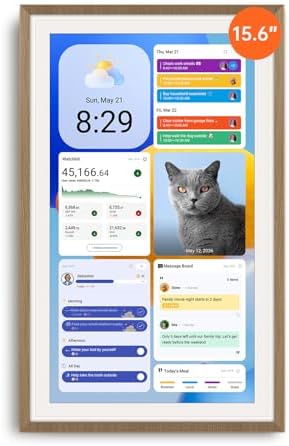
A 15.6-inch touchscreen from Linkdaze's AiMOR app lineup, pairing dependable two-way Google sync with a chore chart, meal planner and photo-frame mode backed by 64GB of storage, at a steep discount in this comparison.
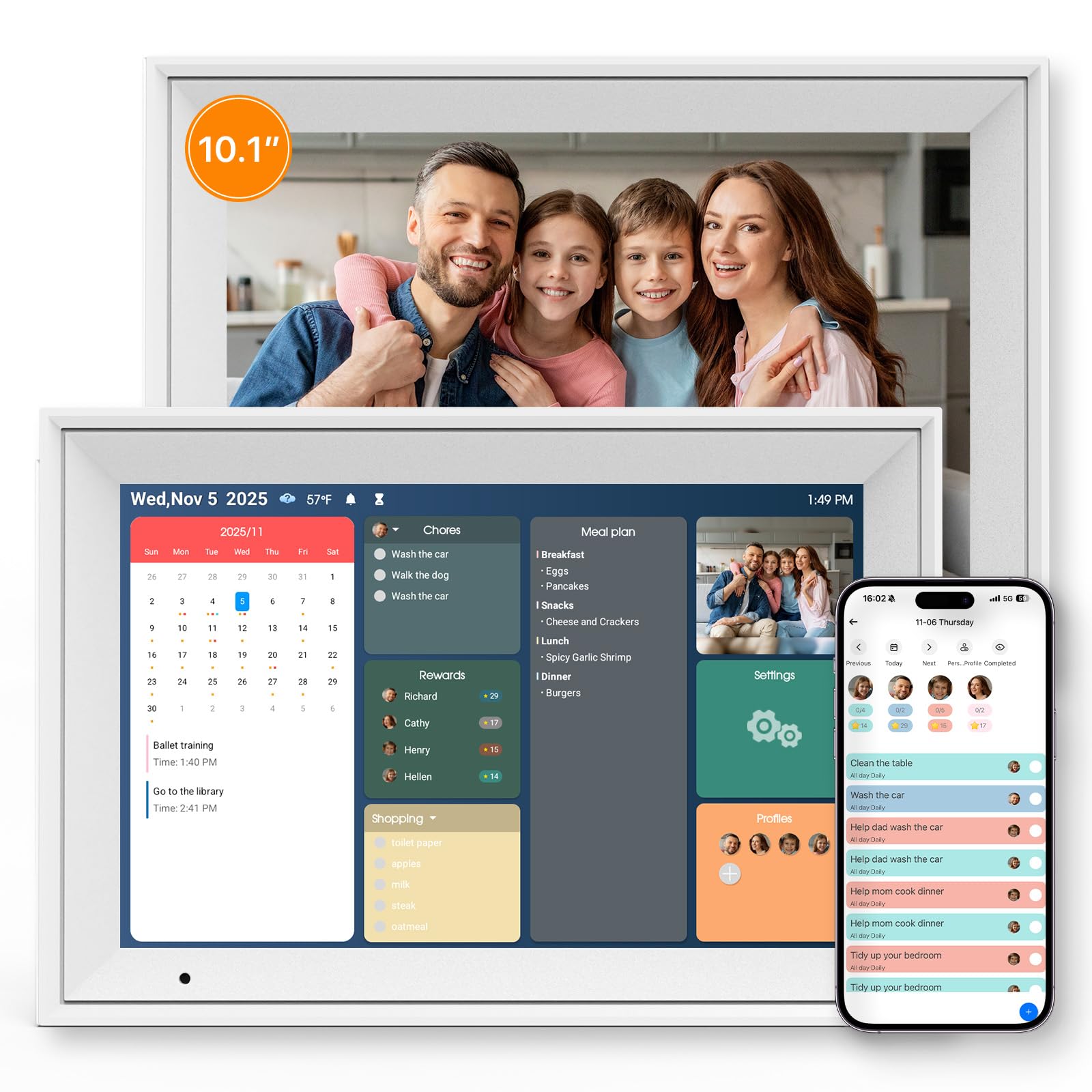
Our Best Affordable pick: a compact 10.1-inch calendar from the Linkdaze line that Nerd Techy called "the heart of our kitchen," pairing dependable two-way Google sync with a chore chart, meal planner and AiMOR-app photo frame at the lowest price in this comparison.
A large 21.5-inch, no-subscription family hub that has drawn unusually broad independent tech-site coverage, pairing a bright anti-glare touchscreen with a gamified chore system and five-service calendar sync.
21.5" 1080p FHD · No subscription · Dual-Mode Android
Our Best for Big Families pick: a 21.5-inch no-subscription family hub with a Dual-Mode system that switches between a focused calendar view and a full Android dashboard with Google Play access.
15.6" 1080p FHD · No subscription · Dual-Mode Android
The same no-subscription Dual-Mode system and family features as Apolosign's larger model, in a 15.6-inch panel with an included stand, at a price well below its 21.5-inch sibling.
Cozyla Calendar+ 2, 24-inch Smart Family Dashboard
4.6
24" touchscreen · No subscription · Google Play Store
The largest screen and most powerful hardware in this comparison, running Cozyla's CalendarOS software, Meals & Pantry planning and zero-subscription model on a 24-inch wall display built for bigger households.
Short on time? These three cover most households: the Linkdaze 15.6-inch as our Best Overall pick, the compact Linkdaze 10.1-inch as the most affordable option, and the Apolosign 21.5-inch for large families with complex schedules.
Digital Calendars 101: What They Do & How to Choose
Understand the category before you buy - what the science actually says, and which specs matter.
These devices all promise a tidy family hub, but what separates a great one from a frustrating one is how many calendar services it actually syncs and whether the chore charts, lists, and reminders cost extra every month. Here is how they work, the one spec that decides whether it earns its place on your wall, and the features worth comparing.
What does a digital calendar actually do?
A digital family calendar is a wall-mounted touchscreen that connects to your home WiFi and shows everyone's schedule in one place. Instead of checking your phone, you glance at the wall and see the whole week at once. Most models run on Android, so they behave like a large, fixed tablet dedicated to the household.
Sync one or more online calendars into a single combined view
Add or edit an event right on the screen, no phone needed
Track chores, tasks, meal plans, and shared lists for each family member
Show photos when no one is actively checking the schedule
The spec that makes or breaks it: what it syncs, and whether features are free
Here is the thing most shoppers miss. A digital calendar only earns its place on your wall if it can pull every family member's separate accounts into one shared view. If it syncs only Google but your partner lives in Outlook and the kids are on iCloud, half the household stays invisible and you are back to checking phones.
So the first spec to check is which services it syncs and how. Every model in this lineup handles the big three, Google, iCloud (Apple), and Outlook. The Cozyla Calendar Plus 2 and both Linkdaze models here go further and add Cozi and Yahoo, which helps if your family already coordinates in one of those. Worth noting: the Apolosign models sync two-way for Google and Outlook, meaning an edit on the wall pushes back to your phone, but iCloud is read-only on those, so Apple events show up without flowing changes back.
The second half of the make-or-break question is cost. Some calendars charge a monthly subscription to unlock chore charts and lists. Every device here is explicitly no-subscription, so the chore charts, meal planners, and shared lists come free for the life of the device. That is the difference between a tool you own and one you keep renting.
Which specs actually matter?
Once you know it syncs everyone's calendars for free, a few features decide which one fits your wall:
Calendar services synced: The core spec. All six sync Google, iCloud, and Outlook. Step up to a Cozyla or a Linkdaze model if you also need Cozi or Yahoo. Check whether sync is two-way, since the Apolosign models are read-only for iCloud.
Subscription: Every model here is no-subscription, so chores, lists, and meal planning are included. This is the feature category most likely to be locked behind a fee elsewhere, so confirm it before you buy.
Screen size: This decides how much of the week you see at a glance. The lineup runs from 10.1 inch compact models up to the 24 inch Cozyla, with several 15.6 inch options and the 21.5 inch Apolosign in between. Bigger screens show more days without scrolling.
Touchscreen: Every model is a touchscreen, so anyone can add an event standing at the wall without opening an app. This is what turns a passive display into a shared hub.
Chores and lists: Look for chore charts, meal planners, and reward systems if you are managing kids. The Apolosign models pair chores with a gamified Chore Wheel rewards system, and the Cozyla models add a dedicated meal planner.
Photo frame mode: A photo display keeps the screen useful when no one is checking the schedule. The Linkdaze 15.6-inch doubles as a digital photo frame using its built-in storage, and the Apolosign models cycle a Google Photos slideshow when idle.
Mount and stand: Confirm how it mounts. The 21.5 inch Apolosign and the 24 inch Cozyla mount on the wall only, while several models, including the 15.6 inch Apolosign, the 15.6 inch BSIMB, and the 10.1 inch Linkdaze, include a stand so you can set them on a counter, so confirm how each one mounts.
How we grade products
Graded Picks rankings are aggregated from several independent signals: verified buyer ratings and the size of the review base for credibility, recent monthly purchase volume for relevance, assessments from trusted home and family tech publications, and how each product places in leading category lineups. For digital calendars we weigh:
Range of calendar services synced and two-way support
Whether key features are free or subscription-locked
Screen size and readability at a glance
Touchscreen responsiveness and ease of adding events
Depth of chore, list, and meal-planning tools
Photo frame and idle-screen usefulness
Mounting flexibility and build quality
Setup note: A digital calendar is only as good as its connection, so plan for a spot near your router with steady WiFi, since these devices sync continuously and can lag or drop events on a weak signal. Give it a permanent power outlet too, because most are wall units meant to stay on, not battery devices you move around.
In-Depth Reviews
Everything we learned from buyer reviews and expert testing, product by product.
A strong runner-up in this lineup. This 15.6-inch Linkdaze pairs the roomiest screen of the budget-friendly Linkdaze models with the AiMOR companion app's full feature set: a color-coded chore chart with automated reminders, meal and shopping-list planning, and the calendar-sync setup itself, plus a photo-frame mode backed by 64GB of built-in storage. Two-way sync covers Google Calendar directly, while iCloud, Outlook, Cozi and Yahoo connect through a link-based sync rather than a native two-way connection. A 42% discount at our last scan brought it to $159.99, the deepest price cut of any calendar in this lineup, combining a readable 15.6-inch screen, dependable sync and strong buyer sentiment into the best all-around balance of screen size, features and price here. Next to the compact 10.1-inch Linkdaze, our Best Affordable pick, it adds a roomier screen and double the storage for about $90 more, while still undercutting most other 15.6-inch-or-larger models here.
Screen size15.6" touchscreen
Resolution1920 x 1080
Storage64GB
Calendar syncGoogle (two-way); iCloud, Outlook, Cozi, Yahoo via link
ConnectivityWiFi
Mount / standWall mountable
Warranty1 year
Pros
Lowest-priced full-size 15.6-inch calendar in this comparison, with Linkdaze's full AiMOR-app feature set
64GB of built-in storage powers the photo-frame mode
Two-way Google Calendar sync, the dependable core the Linkdaze line is known for
Roomy 15.6-inch touchscreen is easy to read from across a kitchen or living room
Steepest discount in this comparison brings it to $159.99
Cons
iCloud, Outlook, Cozi and Yahoo sync via a link rather than native two-way sync
Newer listing with a thinner independent review trail than some established rivals here
No Android app store access - it's calendar-and-chores focused, not a full tablet
Who is it for?
Most households: families who want our Best Overall pick, a bigger, easier-to-read screen than the 10.1-inch Linkdaze at a strong discount, with the same chore and photo-frame tools.
Who is it not for?
Buyers who want native two-way sync for every calendar service, or the single lowest price in this comparison, which the Linkdaze 10.1-inch Best Affordable pick covers.
Our Best Affordable pick. This Linkdaze 10.1-inch is the brand's current in-stock entry in that size, running the same recipe Nerd Techy praised in its review titled 'It Became the Heart of Our Kitchen': a responsive 1280x800 IPS touchscreen that made shared schedules visible during everyday moments like packing lunches or prepping dinner, with events syncing across family members' phones in about 15 minutes. Homecrux and MacSources both reviewed the line favorably, calling it an easy way to bring order to family life with a straightforward setup. Two-way sync covers Google Calendar directly, while iCloud, Outlook, Cozi and Yahoo connect through a link-based sync rather than a native two-way connection. Beyond the calendar, it layers on a color-coded chore chart with reminders, an AI-assisted meal planner that generates a shopping list, and a photo-frame mode fed through the companion AiMOR app with 32GB of built-in storage. It ships with both a wall mount and a stand, so it works equally well mounted or set on a counter. At $69.96, it undercuts every other calendar in this comparison while still covering the sync, chore and photo-frame tools most families actually use, which makes it the best value pick for budget-minded households.
Screen size10.1" IPS HD
Resolution1280 x 800
Storage32GB
Calendar syncGoogle (two-way); iCloud, Outlook, Cozi, Yahoo via link
ConnectivityWiFi (2.4GHz / 5GHz)
Mount / standWall mount and stand included
Warranty1 year
Pros
Lowest price in this comparison, with a wall mount and stand both included
Praised by Nerd Techy, Homecrux and MacSources for dependable everyday use
Two-way Google Calendar sync typically shows shared events within about 15 minutes
Chore chart with reminders and an AI-assisted meal planner with auto-generated shopping lists
AiMOR-app photo frame mode with 32GB of built-in storage
Cons
iCloud, Outlook, Cozi and Yahoo sync via a link rather than native two-way sync
Smaller 10.1" screen is harder to read from across a large kitchen than the wall-mounted flagships here
No Android app store access - it's calendar-and-chores focused, not a full tablet
Who is it for?
Most households, especially mostly-Google ones, that want a dependable calendar with chore and meal-planning tools built in without paying flagship money.
Who is it not for?
iCloud-heavy households needing native two-way sync, or large families who want a bigger wall display.
3. Everblog 21.5-inch Digital Calendar & Chore Chart
4.9
The Everblog 21.5-inch has been reviewed by an unusually wide range of independent outlets for this category, including The Gadgeteer, Notebookcheck, The Geek Church and digicalendars.com, with The Gadgeteer calling it 'a fantastic family organizer.' Testers consistently praise the crisp, bright 1080p IPS panel with anti-glare coating and auto-brightness, the gamified chore chart that rewards completed tasks, and a meal-planning and shared photo-album system layered on top of two-way Google sync plus iCloud, Outlook, Cozi and Yahoo support - all with no subscription fee required. The main recurring complaint in testing is a sync quirk: some reviewers found Google Calendar events occasionally duplicating into two or three entries, and the display can briefly show as 'offline' in the companion app after a deep sleep cycle. Backed by a 2-year warranty and a 180-day return window, it undercuts the Apolosign 21.5-inch flagship on price while matching it on screen size.
Unusually broad independent tech-site coverage for this category, largely positive
Bright, crisp 21.5" anti-glare touchscreen with auto-brightness
Gamified chore chart plus meal planning and shared photo albums
Zero subscription fees, with five-service calendar sync included
2-year warranty and 180-day return window, both above the category norm
Cons
Some reviewers report Google Calendar events occasionally duplicating into multiple entries
Can briefly show as offline in the companion app after the screen deep-sleeps
Newest listing in this comparison, so its long-term track record is still building
Who is it for?
Families who want a large, no-subscription display with the broadest independent review coverage in this lineup, at a lower price than the Apolosign flagship.
Who is it not for?
Buyers who need flawless, bug-free Google Calendar sync out of the box, or who prioritize the single longest-established track record in this comparison.
The Apolosign 21.5-inch is our Best for Big Families pick. It was independently reviewed and named a 'Best of 2026' digital wall calendar by Wired, with editors specifically highlighting its zero-subscription-fee model as a genuine value differentiator against category rivals that charge $79-100 a year. Its Dual-Mode System blends a distraction-free Calendar Mode - color-coded per family member, with a gamified 'Chore Wheel' that awards screen-time points for completed tasks - with a full Android Dashboard for apps and a Google Photos slideshow at night. The 21.5-inch 1080p display with anti-glare coating and auto-brightness is easy to read from across a kitchen, which combined with the color-coded Chore Wheel suits bigger households juggling several schedules at once. One real limitation reviewers flag: iCloud sync is one-directional and only refreshes every few hours, so iPhone households should plan around that.
Screen size21.5" 1080p FHD, anti-glare
Storage64GB (Android 15)
Calendar syncGoogle, iCloud, Outlook (two-way except iCloud)
ConnectivityWiFi, Bluetooth
App ecosystemGoogle Play Store (Google EDLA licensed)
Mount / standWall mount included
Warranty1-year free repair service
Pros
Named a 'Best of 2026' digital calendar by Wired for its no-subscription model
Large 21.5-inch screen - easy to read from across a room
Dual-Mode System: focused calendar view plus full Android dashboard
Gamified Chore Wheel rewards kids with screen-time points
Google Play Store access for apps and streaming at night
Cons
iCloud sync is one-directional and refreshes only every few hours
Needs a dedicated wall spot for its 21.5-inch footprint
AI features are a separate optional subscription on top of the core purchase
Who is it for?
Larger families who want a big, capable display for coordinating multiple schedules and are comfortable primarily on Google or Outlook calendars - our Best for Big Families pick for exactly that need.
Who is it not for?
All-iPhone households that need instant two-way iCloud sync, or anyone who wants a smaller countertop unit.
The Apolosign 15.6-inch carries the same Wired-recognized, no-subscription Dual-Mode System as the rest of the Apolosign line - a focused Calendar Mode with color-coded family schedules and a gamified Chore Wheel, plus a full Android Dashboard with Google Play access - built around an octa-core platform with 4GB RAM and 64GB of storage running Android 15. It ships with an included stand, so it works equally well mounted on the wall or set on a counter or desk, and it's priced well below the larger 21.5-inch Apolosign model in this lineup while keeping the identical software. The one real limitation carried across the Apolosign line: iCloud sync is one-directional and only refreshes every few hours, so iPhone-heavy households should plan around that.
Screen size15.6" 1080p FHD
Storage64GB (Android 15)
Calendar syncGoogle, iCloud, Outlook (two-way except iCloud)
ConnectivityWiFi, Bluetooth
App ecosystemGoogle Play Store (Google EDLA licensed)
Mount / standIncluded stand or wall mount
Warranty1-year free repair service
Pros
Apolosign's full no-subscription Dual-Mode software in a more compact, lower-priced panel
Included stand makes it desk- or counter-friendly, not just wall-mounted
Gamified Chore Wheel and color-coded family schedules
Google Play Store access for apps and a nighttime photo slideshow
Lower price than the 21.5-inch Apolosign model with the same core software
Cons
Same one-directional, delayed iCloud sync as the rest of the Apolosign line
Smaller screen than the 21.5-inch Apolosign model in this lineup
AI features remain a separate optional subscription
Who is it for?
Most families who want Apolosign's full no-subscription Dual-Mode software without paying for the largest possible screen.
Who is it not for?
iPhone-heavy households needing instant iCloud sync, or those who specifically want the biggest display.
6. Cozyla Calendar+ 2, 24-inch Smart Family Dashboard
4.6
The biggest screen and most capable hardware in this lineup. The 24-inch Calendar+2 runs Cozyla's acclaimed CalendarOS software - color-coded family schedules, the Meals & Pantry app with auto-generated grocery lists, and full Google Play Store access on a Google-certified Android TV platform - stretched across the largest touchscreen in this comparison. Buyers on Walmart's product page consistently call the display bright, clear and responsive from across a room, with painless setup and syncing, and several specifically praise Cozyla's customer service for resolving issues within hours. At 4.7 kilograms it is also the heaviest unit here and wall-mounts only, with no desk-stand option, and one recurring buyer complaint is that the power adapter sticks out from the outlet enough to get bumped in high-traffic spots. There is no subscription fee for sync, chores or meal planning. A 20% discount at our last scan brought it to $699.99, still the priciest calendar in this lineup, but the combination of the biggest screen, the most powerful hardware and Cozyla's proven software makes it a strong option for larger households juggling complex schedules.
Screen size24" touchscreen
Storage128GB (8GB RAM, Android TV)
Calendar syncGoogle, iCloud, Outlook, Cozi, Yahoo
ConnectivityWiFi, Bluetooth
App ecosystemGoogle Play Store (Google certified)
Mount / standWall mount only
Warranty1 year + 24/7 customer service
Pros
Our Best for Big Families pick: Cozyla's acclaimed CalendarOS software, the same line reviewed by Forbes, T3 and Bob Vila
Largest touchscreen in this comparison at 24 inches, easy to read from across a room
8GB RAM and 128GB storage - the most powerful hardware in this lineup
Zero subscription fees for sync, chores or meal planning
Full Google Play Store access via a Google-certified Android TV platform
Cons
Priciest calendar in this comparison by a wide margin
Power adapter sticks out from the outlet - a recurring buyer complaint
Heaviest unit here at 4.7 kg, wall-mount only with no desk-stand option
Who is it for?
Larger households with the wall space and budget for Cozyla's proven software on the biggest screen in this comparison - our Best for Big Families pick.
Who is it not for?
Buyers who want similar family-organizing features without the premium price - the Apolosign 15.6-inch or the Linkdaze 15.6-inch Smart cost significantly less, though with different software.
The stars you see are the Graded Picks cumulative score, not a single retailer's average. It blends verified buyer reviews aggregated across major retailers, assessments from professional reviewers and expert testers, and how prominently the product features in leading category lineups.
Advertising Disclosure
Our rankings are compiled by aggregating several independent signals, including verified buyer feedback, how popular a product currently is with shoppers, and evaluations published by professional reviewers. Editorial opinions are our own.
Please note that we participate in affiliate marketing programs. When you purchase through links on our site, we may earn a commission. As an Amazon Associate we earn from qualifying purchases. This comes at no additional cost to you and helps support the resources required to provide valuable content.